 RuyiSDK Board Docs
RuyiSDK 性能测试示例
环境说明
- 硬件环境:Licheepi 4A 开发板(th1520)
- 软件环境:Debian/openEuler for RISC-V
一、Ruyi环境搭建
更新 Ruyi 索引并安装工具链
ruyi update
ruyi install gnu-plct-xthead
正常情况下,终端会看到如下输出:
debian@revos-lpi4a:~$ ruyi install gnu-plct-xthead
info: skipping already installed package gnu-plct-xthead-3.1.0-ruyi.20250526
创建并激活 Ruyi 虚拟环境
# 创建虚拟环境,命名为 dhrystone-venv,使用 sipeed-lpi4a profile
ruyi venv -t gnu-plct-xthead sipeed-lpi4a dhrystone-venv

# 进入虚拟环境目录
cd dhrystone-venv

# 激活虚拟环境
source ./bin/ruyi-activate
正常情况下,终端会看到如下输出:
debian@revos-lpi4a:~$ ruyi venv -t gnu-plct-xthead sipeed-lpi4a dhrystone-venv
info: Creating a Ruyi virtual environment at dhrystone-venv...
info: The virtual environment is now created.

You may activate it by sourcing the appropriate activation script in the bin directory, and deactivate by invoking `ruyi-deactivate`.

A fresh sysroot/prefix is also provisioned in the virtual environment.
It is available at the following path:
  /home/debian/dhrystone-venv/sysroot

The virtual environment also comes with ready-made CMake toolchain file and Meson cross file. Check the virtual environment root for those; comments in the files contain usage instructions.

debian@revos-lpi4a:~$ cd dhrystone-venv
debian@revos-lpi4a:~/dhrystone-venv$ source ./bin/ruyi-activate
«Ruyi dhrystone-venv» debian@revos-lpi4a:~/dhrystone-venv$ riscv64-plctxthead-linux-gcc --version
riscv64-plctxthead-linux-gcc (RuyiSDK 20250526 Xuantie-Sources Xuantie-binutils-8ee62aac8606 Xuantie-gcc-c2e0bcc86d1f Xuantie-glibc-29dd660835c5) 14.1.1 20240710
Copyright (C) 2024 Free Software Foundation, Inc.
This is free software; see the source for copying conditions. There is NO warranty; not even for MERCHANTABILITY or FITNESS FOR A PARTICULAR PURPOSE.
验证GCC版本
riscv64-plctxthead-linux-gnu-gcc --version
make --version
二、获取 Dhrystone 源码并编译
克隆 Dhrystone 源码
# 创建工作目录(在虚拟环境内)
mkdir -p ~/projects/dhrystone && cd ~/projects/dhrystone

# 克隆仓库
git clone https://github.com/Keith-S-Thompson/dhrystone.git
cd dhrystone
正常情况下,终端会看到如下输出:
«Ruyi dhrystone-venv» debian@revyos-lpi4a:~/dhrystone-venv$ mkdir -p ~/projects/dhrystone && cd ~/projects/dhrystone
«Ruyi dhrystone-venv» debian@revyos-lpi4a:~/projects/dhrystone$ git clone https://github.com/Keith-S-Thompson/dhrystone.git
Cloning into 'dhrystone'...
remote: Enumerating objects: 79, done.
remote: Counting objects: 100% (20/20), done.
remote: Compressing objects: 100% (10/10), done.
remote: Total 79 (delta 14), reused 10 (delta 10), pack-reused 59 (from 1)
Receiving objects: 100% (79/79), 217.86 KiB | 177.00 KiB/s, done.
Resolving deltas: 100% (29/29), done.
«Ruyi dhrystone-venv» debian@revyos-lpi4a:~/projects/dhrystone$ cd dhrystone
«Ruyi dhrystone-venv» debian@revyos-lpi4a:~/projects/dhrystone/dhrystone$
使用 nano 添加缺失的头文件
#进入最常用的 v2.1 目录
cd v2.1

#用 nano 打开 dhry_1.c
nano dhry_1.c
使用键盘方向键将光标移动到 #include "dhry.h" 这一行的下方(通常是第 18 行或第 19 行附近)。然后在新的一行中依次输入以下内容:
#include <stdlib.h>按下 Ctrl+O 保存文件(按回车确认文件名),然后按 Ctrl+X 退出 nano。
删除冲突的旧式函数声明
继续使用 nano 编辑 dhry_1.c(或使用 sed 快速删除)。找到包含 extern char *malloc 和 extern int times 的行,将它们删除或注释掉。也可以使用以下 sed 命令自动删除:
sed -i '/extern char.*malloc/d' dhry_1.c
sed -i '/extern  int.*times/d' dhry_1.c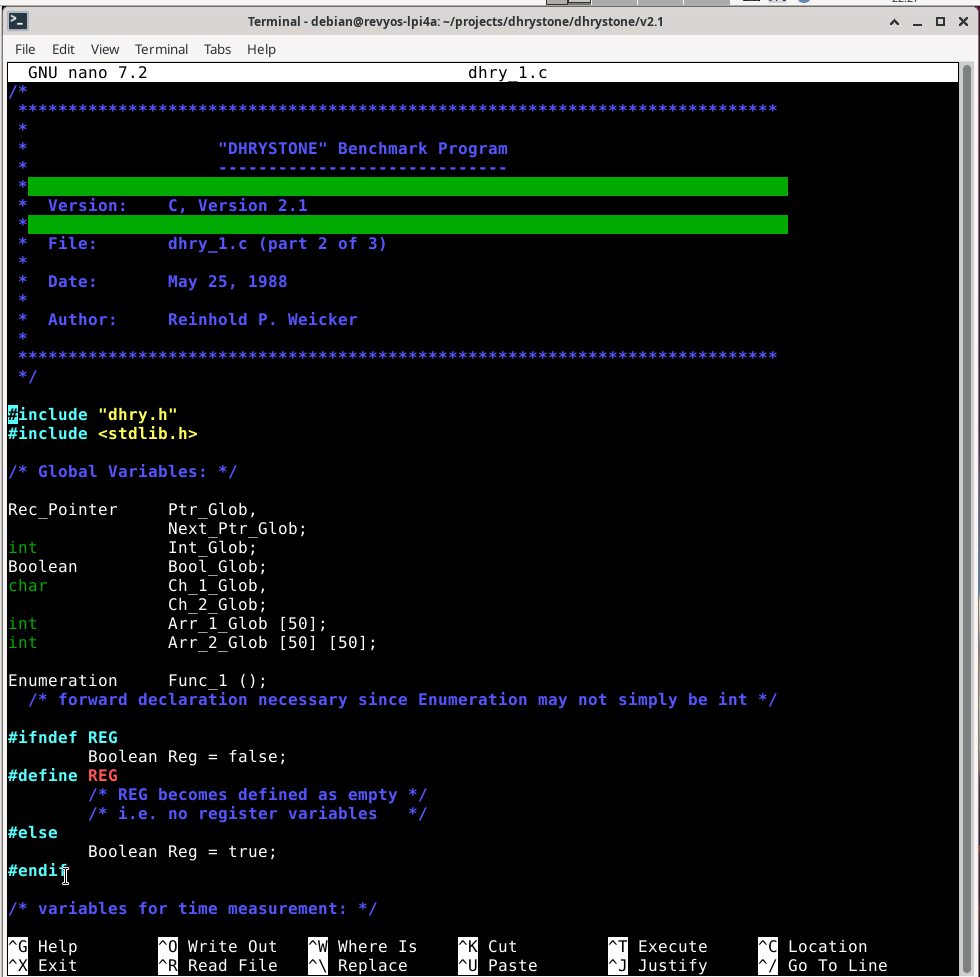
修正重复包含头文件的问题
如果 dhry_1.c 中重复包含了 #include "dhry.h"(例如第 18 行和第 19 行都是该包含),需删除一行。可用以下命令查看文件开头:
cat -n dhry_1.c | head -20若发现重复,再次使用 nano 打开文件,删除多余的那一行,保存退出。
调整循环次数
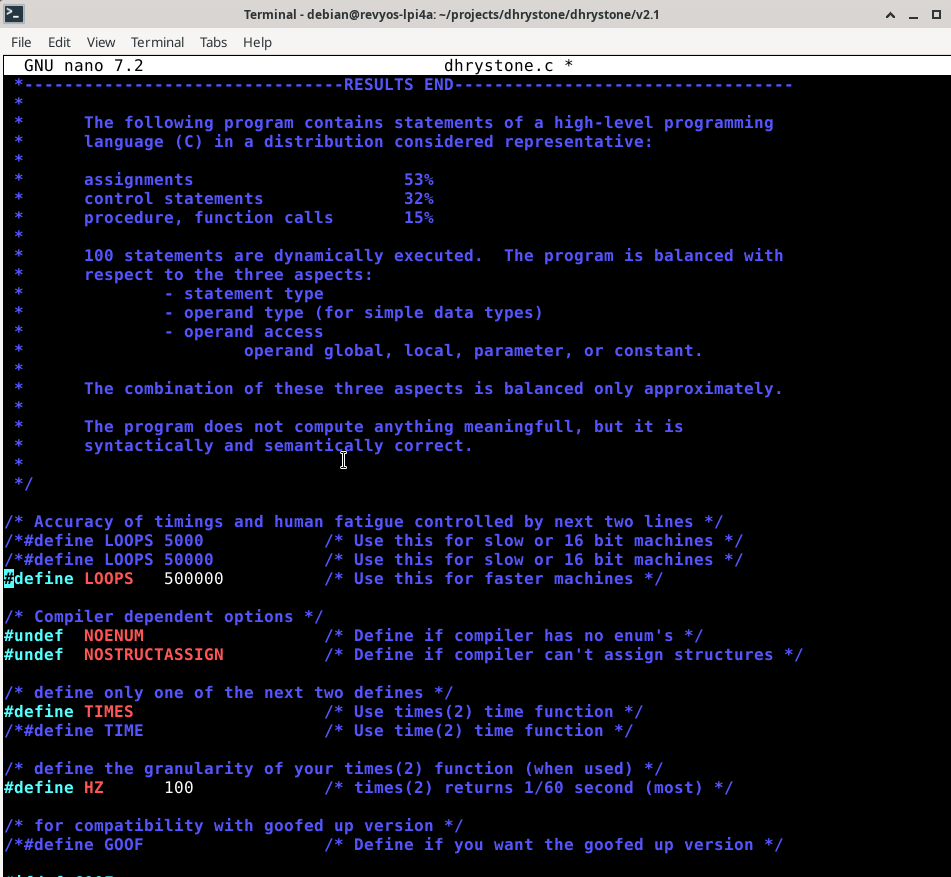
默认循环次数为 50000,在 TH1520 上运行时间过短,会导致计时为零。建议修改为 500000 以获得数秒的运行时间。用 nano 打开 dhry_1.c,找到 #define Number_Of_Runs 50000,将其改为:
#define Number_Of_Runs 500000按下 Ctrl+O 保存文件(按回车确认文件名),然后按 Ctrl+X 退出 nano。
编译
riscv64-plctxthead-linux-gnu-gcc -std=gnu90 -O2 -DNOENUM -DTIMES -DHZ=100 -o dhrystone dhry_1.c dhry_2.c -lm正常情况下,终端会看到如下输出:
«Ruyi dhrystone-venv» debian@revos-lpi4a:~projects/dhrystone/dhrystone/v2.1$ nano dhry_1.c
«Ruyi dhrystone-venv» debian@revos-lpi4a:~projects/dhrystone/dhrystone/v2.1$ riscv64-unknown-linux-gnu-gcc -std=gnu99 -O2 -DNOENUM -DTIMES -DHZ=100 -o dhrystone dhry_1.c dhry_2.c -lm
dhry_1.c: In function ‘main’:
dhry_1.c:97:3: warning: incompatible implicit declaration of built-in function ‘strcpy’ [-Wbuiltin-declaration-mismatch]
  97 |    strcpy (Ptr_Glob->variant.var_1.Str_Comp,
     |    ^~~~~~
dhry_1.c:20:1: note: include ‘<string.h>’ or provide a declaration of ‘strcpy’
   19 | #include <stdlib.h>
+++ | +#include <string.h>
   20 |
dhry_1.c:223:40: warning: cast from pointer to integer of different size [-Wpointer-to-int-cast]
  223 |    printf ("  Ptr_Comp:       %d\n", (int) Ptr_Glob->Ptr_Comp);
      |                                        ^
dhry_1.c:234:40: warning: cast from pointer to integer of different size [-Wpointer-to-int-cast]
  234 |    printf ("  Ptr_Comp:       %d\n", (int) Next_Ptr_Glob->Ptr_Comp);
      |                                        ^
«Ruyi dhrystone-venv» debian@revos-lpi4a:~projects/dhrystone/dhrystone/v2.1$ ./dhrystone
Dhrystone Benchmark, Version 2.1 (Language: C)

Program compiled without 'register' attribute

Please give the number of runs through the benchmark: 10000000

Execution starts, 10000000 runs through Dhrystone
Execution ends

Final values of the variables used in the benchmark:

Int_Glob:            5
三、运行 Dhrystone 基准测试
./dhrystone程序启动后,会提示输入运行的循环次数:
Please give the number of runs through the benchmark:输入一个较大的数字(例如 10000000)并按回车,让测试运行足够长的时间以获得稳定结果。 为了方便自动化测试,也可以使用管道输入:
echo 10000000 | ./dhrystone正常情况下,终端会看到如下输出:
A«Ruyi dhrystone-venvA» debian@RevOS:~projects/dhrystone/dhrystone/v2.1$ ./dhrystone.c

Dhrystone Benchmark, Version 2.1 (Language: C)
Program compiled without 'register' attribute

Please give the number of runs for the benchmark: 10000000

Execution starts: 10,000,000 iterations of Dhrystone
Execution ends.

Final benchmark values:
Int_Glob: 5
  should be: 5
Bool_Glob: 1
  should be: 1
Ch_1_Glob: A
  should be: A
Ch_2_Glob: B
  should be: B
Arr_1_Glob[8]: 7
  should be: 7
Arr_2_Glob[8][7]: 10000010
  should be: Number_Of_Runs + 10
Ptr_Glob->
  Ptr_Comp: 90784
    should be: (implementation-dependent)
  Discr: 0
    should be: 0
  Enum_Comp: 2
    should be: 2
  Int_Comp: 17
    should be: 17
  Str_Comp: DHRYSTONE PROGRAM, SOME STRING
    should be: DHRYSTONE PROGRAM, SOME STRING
Next_Ptr_Glob->
  Ptr_Comp: 90784
    should be: (implementation-dependent), same as above
  Discr: 0
    should be: 0
  Enum_Comp: 1
    should be: 1
  Int_Comp: 18
四、返回上级目录并退出 Ruyi 虚拟环境
# 返回上级目录
cd ..

# 退出 Ruyi 虚拟环境
ruyi-deactivate
正常情况下,终端会看到类似如下输出:
A«Ruyi dhrystone-venvA» debian@revos-lpi4a:~/projects/dhrystone/dhrystone/v2.1$ cd ..
A«Ruyi dhrystone-venvA» debian@revos-lpi4a:~/projects/dhrystone/dhrystone$ ruyi-deactivate
debian@revos-lpi4a:~/projects/dhrystone/dhrystone$